From Pre-Assessment Prompts to Post-Assessment Letters: Responding Right, Fast

Even tight compliance can throw up a warning. The difference between a 10-minute fix and a 10-week headache is how you respond. Here’s a practical walkthrough—from the moment eFiling flashes a pre-assessment prompt to the day you close out a verification.

Stage 1: Pre-assessment prompts (the yellow light)

These messages are early warnings—e.g., “excessive output/input” on VAT, “excessive change in liability” on EMP501. They’re not rejections; they’re asking: “Are you sure?”

Best practice response:

  • Don’t ignore it. Investigate the variance immediately.
  • Check for fat-finger errors (extra zero, wrong sign, wrong period).
  • If genuine, add a brief variance memo to your working papers (e.g., large stock purchase, asset acquisition, once-off bonus run).
  • Re-run reconciliations (VAT-to-revenue; payroll GL ↔ EMP501) to confirm the story holds.

Why it matters: Cleaning anomalies at the source reduces the chance of post-assessment verification.

Stage 2: Post-assessment verification (the red light)

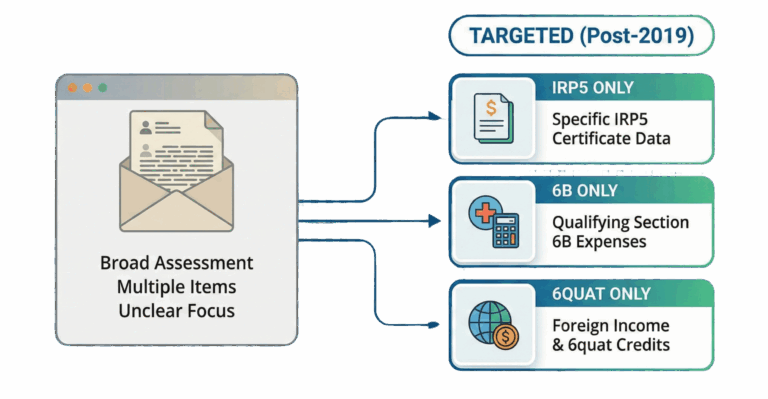
If risk persists, SARS issues a targeted letter that pinpoints the flagged item(s). Today’s letters are more precise: you might see requests for only an IRP5, only a Section 6B medical schedule, or only your Section 6quat foreign tax credit pack.

Best practice response:

  • Answer with surgical precision. Upload exactly what’s requested—no kitchen-sink bundles.
  • Use clear file names (“S6B_MedicalSchedule_2025.pdf”; “IRP5_1234567890.pdf”).
  • Include a 1-page cover sheet that lists each document and what it proves.
  • Check legibility and completeness (signatures, totals, dates).
  • Keep a mirror folder of what you uploaded for future reference.

Timing: Fast, accurate responses signal cooperation and often shorten cycle time.

The three most common post-assessment asks (and how to nail them)

  1. IRP5 / Remuneration proof
    • Pull the official IRP5; match the certificate number.
    • If multiple employers, supply each certificate exactly as requested.
    • Where relevant, reconcile the IRP5 totals to EMP501 and payroll GL.
  2. Section 6B – Additional medical expenses
    • Provide the medical aid certificate, detailed schedule of qualifying expenses, and supporting slips where relevant.
    • Distinguish between qualifying vs non-qualifying out-of-pocket items.
  3. Section 6quat – Foreign tax credit
    • Provide foreign tax certificates (official), foreign tax year details, income schedules by source/country, and methodology for exchange rates/dates.

Cross-tax linking during verification

Expect SARS to cross-check:

  • VAT turnover vs ITR14 revenue (exclusive of VAT).
  • Payroll expense vs EMP501/IRP5 totals.
  • Your input VAT vs supplier output VAT (inter-taxpayer checks).
  • Property disposals vs Deeds Office data (CGT completeness).

Tip: Include a short recon schedule in your upload if the request touches one side of a known bridge. It answers the question they’re about to ask next.

Documentation hygiene: set it once, benefit for years

  • Version-controlled PDFs (no photos of crumpled slips).
  • Master index for the tax year (by tax type and risk area).
  • Supplier VAT validation snapshot for the year (especially for large claims).
  • Logbooks and diesel rebate logs prepared monthly, not retro-fitted at year-end.
  • Foreign income pack assembled as transactions occur.

What to avoid

  • Over-disclosure: uploading tangential documents can create new threads of inquiry.
  • “We’ll get it if they ask”: risky. If you can’t substantiate today, don’t claim today.
  • Ignoring pre-assessment prompts: they’re there to help you correct early.

Next in the series: (5 of 5) What’s Next (Tax Admin 3.0): AI Matching, VAT POS Integration & How to Future-Proof Your Practice.

MAW Disclaimer

Important Disclaimer

This material by Managing Advancing Wealth (Pty) Ltd (MAW) is general information only and not accounting, tax, legal, financial, or investment advice. Laws and guidance change over time; accuracy is not guaranteed. No liability is accepted for actions taken in reliance on it. No client relationship arises until MAW issues and you accept a Letter of Engagement. For advice tailored to your circumstances, please contact MAW.

Branded Article Footer – Zoho Services CTA

Ready to Transform Your Business?

If this article resonates with you, here’s how to get started

Start with Zoho Books

FREE Up to 1000 invoices/year

Get started with Zoho Books completely free, limited to 1000 invoices per year. Once you reach this limit, your business should be growing steadily and you can upgrade to the next tier.

Yes, completely free to use up to 1000 invoices
Sign up here

Scale with Zoho One

30-DAY TRIAL Complete ERP Suite

Need an ERP system to bridge the gap with enterprise business? Zoho One provides incredible value and all the apps you require to take your business to the next level.

30 Days free trial – test it out completely
Sign up here

Both solutions grow with your business – start small, scale seamlessly

Secure & Reliable
Expert Support
Business Growth
Warning